Run A GUI APPs inside a Docker Container - Geek Culture - Medium
四月 17, 2025 [C/C++] #Linux #obsidian #容器 #编译链接Run A GUI APPs inside a Docker Container - Geek Culture - Medium
原文链接:https://medium.com/geekculture/run-a-gui-software-inside-a-docker-container-dce61771f9
In this article, we are going to run a Firefox application which is basically a GUI Software inside a Docker Container.
What are Linux containers?
Linux containers are technologies that allow you to package and isolate applications with their entire runtime environment — all of the files necessary to run. This makes it easy to move the contained application between environments (dev, test, production, etc.) while retaining full functionality. Containers are also an important part of IT security. By building security into the container pipeline and defending your infrastructure, you can make sure your containers are reliable, scalable, and trusted.
Why use Linux containers?
Linux containers help reduce conflicts between your development and operations teams by separating areas of responsibility. Developers can focus on their apps and operations teams can focus on the infrastructure. And, because Linux containers are based on open source technology, you get the latest and greatest advancements as soon as they’re available. Container technologies — including CRI-O, Kubernetes, and Docker — help your team simplify, speed up, and orchestrate application development and deployment.
What is Docker?
The Docker technology uses the Linux kernel and features of the kernel, like Cgroups and namespaces, to segregate processes so they can run independently. This independence is the intention of containers — the ability to run multiple processes and apps separately from one another to make better use of your infrastructure while retaining the security you would have with separate systems.
(迁移注:原图片缺失
assets/0lSZklwNLiZrkoitK-20240820231850-mbx1jk4.gif,已移除)
Container tools, including Docker, provide an image-based deployment model. This makes it easy to share an application, or set of services, with all of their dependencies across multiple environments. Docker also automates deploying the application (or combined sets of processes that make up an app) inside this container environment.
These tools built on top of Linux containers — what makes Docker user-friendly and unique — gives users unprecedented access to apps, the ability to rapidly deploy, and control over versions and version distribution.
👨💻 Docker vs. Linux containers: Is there a difference?
Although sometimes confused, Docker is not the same as a traditional Linux container. Docker technology was initially built on top of the LXC technology — which most people associate with “traditional” Linux containers — though it’s since moved away from that dependency. LXC was useful as lightweight virtualization, but it didn’t have a great developer or user experience. The Docker technology brings more than the ability to run containers — it also eases the process of creating and building containers, shipping images, and versioning images, among other things.
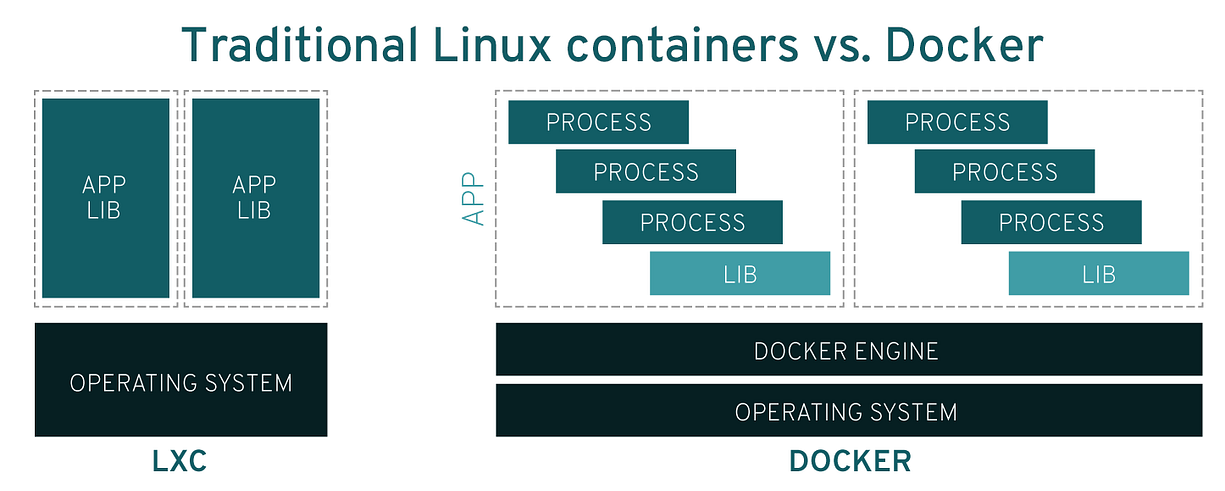
Traditional Linux containers use an init system that can manage multiple processes. This means entire applications can run as one. The Docker technology encourages applications to be broken down into their separate processes and provides the tools to do that. This granular approach has its advantages.
🚀 Advantages of Docker containers 🚀
- Modularity
- Layers and image version control
- Rollback
- Rapid deployment
💡 So, Docker technology is a more granular, controllable, microservices-based approach that places greater value on efficiency.