GUNBash 系列(四)Shell 管道、重定向、序列、复合命令总结
十二月 06, 2024 [C/C++] #Shell 与命令行 #obsidian #编译链接GUNBash 系列(四)Shell 管道、重定向、序列、复合命令总结
简单命令(Simple Commands)
即单个命令。
管道(Pipelines)

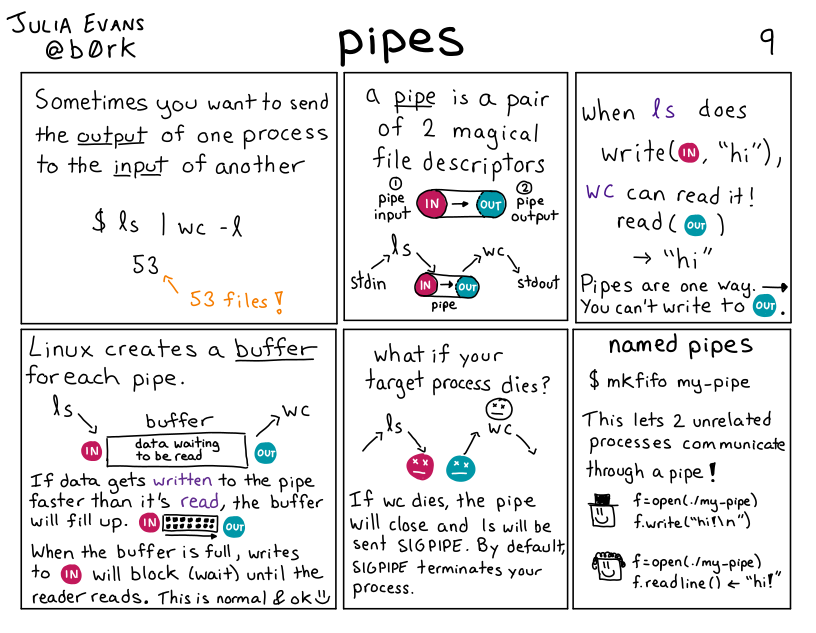
pipeline(管道)是一个或多个命令的序列,用字符 | 分隔。管道的命令格式如下:
command [ | command2 ... ]
管道的特点如下:
- 管道是一个由“标准输入输出”链接起来的进程集合;
- 管道中的每个命令都作为单独的进程来执行(即在一个子 shell 中启动);
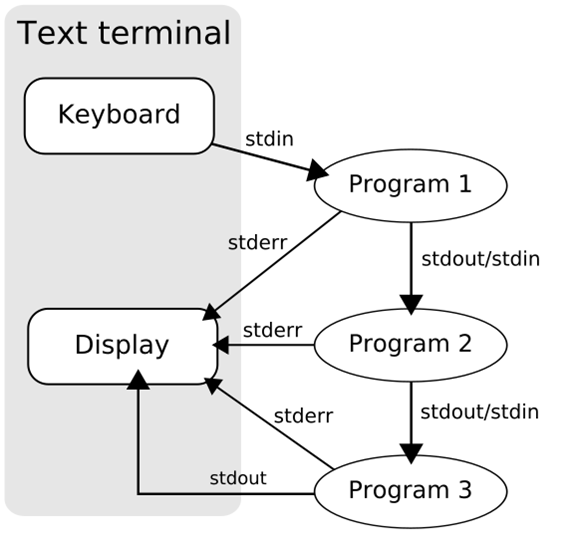
- 每一个进程的输出(stdout)被直接作为下一个进程的输入(stdin);
- 管道命令不处理 standard error output(stderr);
- 管道的符号为:
|
管道的处理流程如下图:
重定向(Redirection)
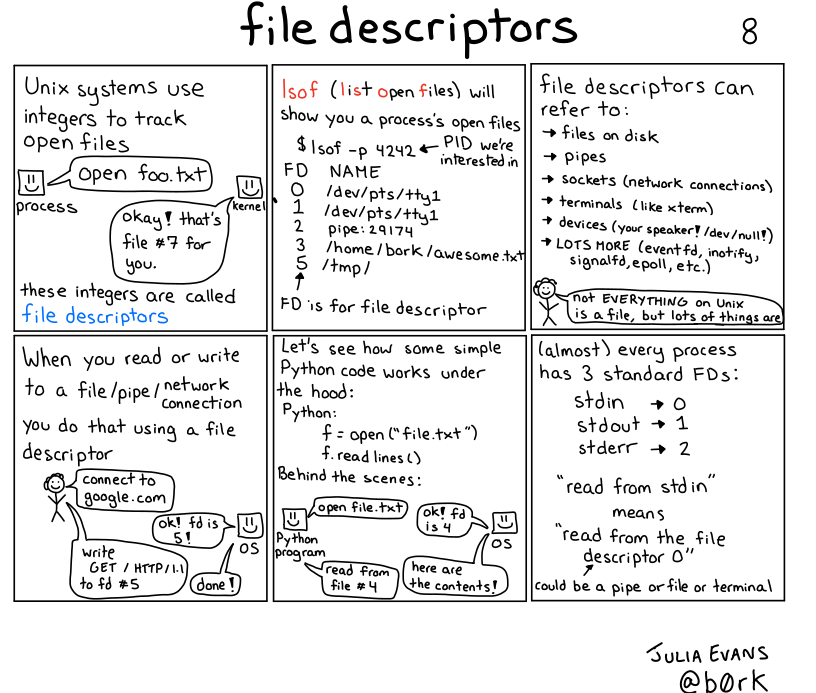
描述符(Descriptor Number)
| 描述符 | 名称 | 描述 |
|---|---|---|
0 | stdin | 标准输入(Standard input) |
1 | stdout | 标准输出(Standard output) |
2 | stderr | 标准错误输出(Standard error) |
操作符(Operator)
| 操作符 | 描述 |
|---|---|
< | 重定向输入(Redirecting Input) |
> | 重定向输出(Redirecting Output),与1>等价 |
>> | 追加到重定向输出(Appending Redirected Output) |
2> | 重定向错误输出(Redirecting Error) |
2>> | 追加到重定向错误输出(Appending Redirected Error) |
&> | 重定向标准输出和标准错误输出(Redirecting Standard Output and Standard Error)。推荐使用,它与>word 2>&1在语义上等价 |
>& | 同上,但不推荐使用 |
2>&1 | 将标准错误输出重定向到标准输出 |
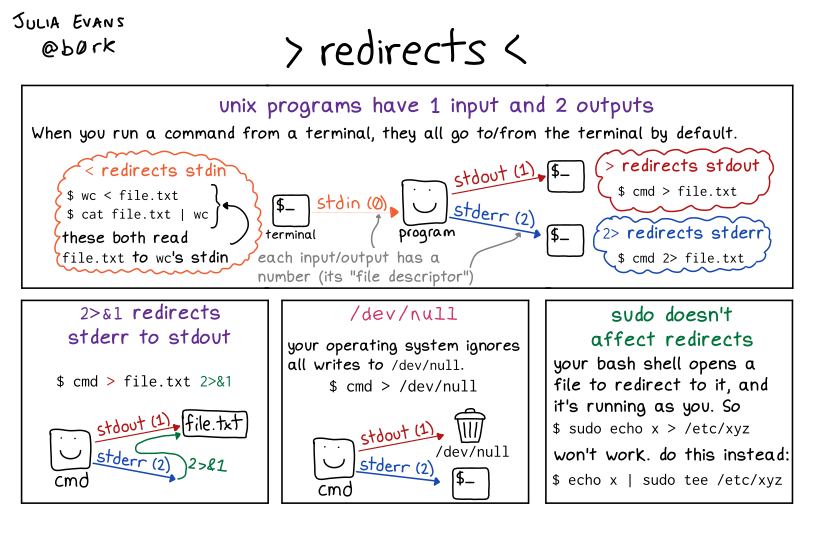
在命令执行前,它的输入和输出可能被 redirected (重定向),该功能可以用于如下场景:
- 屏幕输出的信息很重要,而且需要将它存下来时;
- 一些运行命令的可能已知错误信息,想以
2> /dev/null将它丢掉; - 一些系统的例行命令(例如写在
/etc/crontab)的运行结果,需要存下来时; - 错误信息与正确信息需要分别输出时。
例子:
快速创建带内容的文件:
$ echo "hello world" > /tmp/file
将 stdout 和 stderr 都重定向到本地日志文件:
java -jar app.jar >/tmp/stdout.log 2>&1
将 stdout 和 stderr 都丢弃(等价操作):
java -jar app.jar >/dev/null 2>&1
java -jar app.jar &>/dev/null
序列(Lists of Commands)
list(序列)是一个或多个管道,用操作符 ;、&、&&、|| 分隔的序列, 并且可以选择用 ;、&、`` 新行符结束。
| 操作符 | 例子 | 描述 |
|---|---|---|
&& | command1 && command2 | 一个 AND 序列。command2 只有在 command1 返回 0 时才被执行 |
|| | command1 || command2 | 一个 OR 序列。command2 只有在 command1 返回非 0 状态时才被执行 |
; | command1; command2 | 结束一个序列。不考虑命令的退出状态,连续执行命令 |
| `` | command<newline> | 结束一个序列 |
& | command1 & | 如果一个命令是由 & 结束的, shell 将在后台的子 shell 中执行这个命令 |
- AND 和 OR 序列的返回状态是序列中最后执行的命令的返回状态。
- 这些序列操作符中,
&&和||优先级相同,;和&优先级相同。
退出状态(Exit Status)
- 从 shell 的角度看,一个命令退出状态是 0 意味着成功退出。 非零状态值表明失败。
- 如果没有找到命令,为执行它而创建的子进程返回 127。
- 如果找到了命令但是文件不可执行,返回状态是 126。
- 如果命令由于扩展或重定向错误而失败,退出状态大于零。
使用场景
在某些情况下,很多命令我想要一次输入去运行,有两种方法:
- Shell Script
- 使用序列
例如,一串无人值守源代码形式安装的命令如下:
$ ./configure && make && make install
复合命令(Compound Commands)
compound command(复合命令)是如下情况之一:
1
(list){ list; }((expression))[[ expression ]]
if statements
if list; then list; [ elif list; then list; ] ... [ else list; ] fi
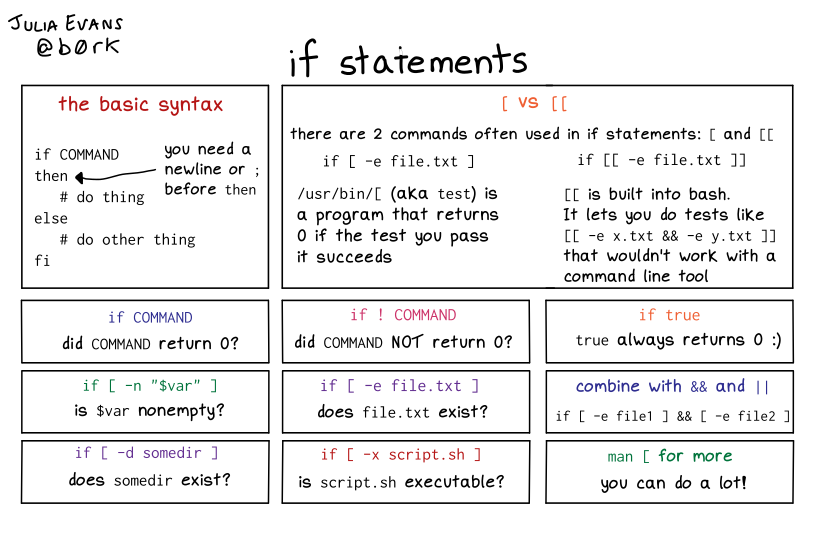
select name [ in word ] ; do list ; donecase word in [ [(] pattern [ | pattern ]
select in 通常和 case in 一起使用,在用户输入不同的编号时可以做出不同的反应,见:https://blog.csdn.net/yrx420909/article/details/104308041
for loops
-
while list; do list; done -
until list; do list; done -
for name [ in word ] ; do list ; done#!/bin/bash # 声明一个数组变量 order_array=( 10000 10001 10002 ) # 循环打印与保存到文件 for id in ${order_array[@]} do echo "order is $id" | tee -a result.txt done -
for (( expr1 ; expr2 ; expr3 )) ; do list ; done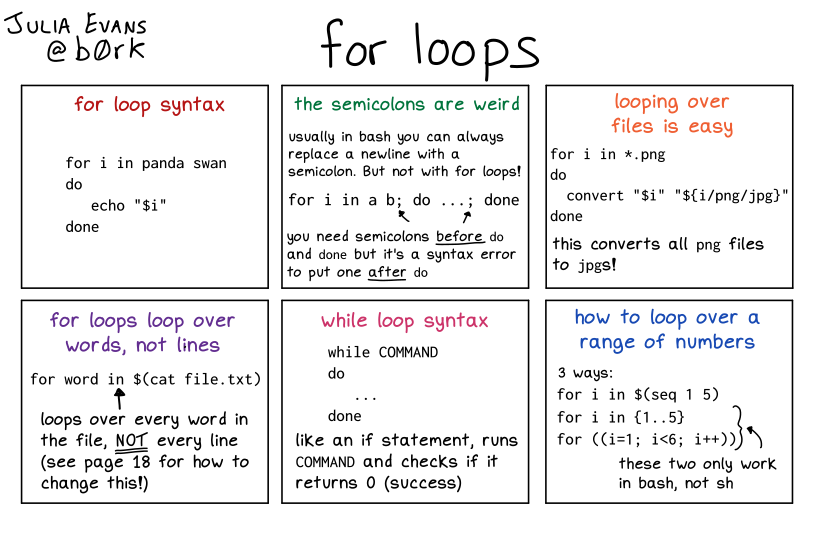
参考
https://www.gnu.org/savannah-checkouts/gnu/bash/manual/bash.html#Arrays
https://www.gnu.org/savannah-checkouts/gnu/bash/manual/bash.html#Shell-Commands