CloudEngine S8700 V600R024C00 配置指南-以太网交换
一月 15, 2025 更新: 二月 25, 2025 [Linux 与系统] #obsidian #嵌入式CloudEngine S8700 V600R024C00 配置指南-以太网交换
举例:配置VLANIF接口实现不同VLAN间的互通(同设备)
组网需求
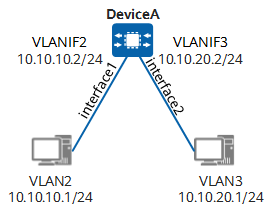
如图4-16所示,DeviceA下的主机被划分到不同的VLAN中,分别是VLAN2和VLAN3,且位于不同的网段。希望实现VLAN2和VLAN3之间相互通信。
图4-16 配置VLANIF接口实现不同VLAN间的互通组网图(同设备)
本例中interface1、interface2分别代表10GE 1/0/1、10GE 1/0/2。
操作步骤
-
创建VLAN,并配置接口加入VLAN。
<HUAWEI> system-view [HUAWEI] sysname DeviceA [DeviceA] vlan batch 2 3 [DeviceA] interface 10ge 1/0/1 [DeviceA-10GE1/0/1] portswitch [DeviceA-10GE1/0/1] port link-type access [DeviceA-10GE1/0/1] port default vlan 2 [DeviceA-10GE1/0/1] quit [DeviceA] interface 10ge 1/0/2 [DeviceA-10GE1/0/2] portswitch [DeviceA-10GE1/0/2] port link-type access [DeviceA-10GE1/0/2] port default vlan 3 [DeviceA-10GE1/0/2] quit -
配置VLANIF接口的IP地址。
[DeviceA] interface vlanif 2
[DeviceA-Vlanif2] ip address 10.10.10.2 24
[DeviceA-Vlanif2] quit
[DeviceA] interface vlanif 3
[DeviceA-Vlanif3] ip address 10.10.20.2 24
[DeviceA-Vlanif3] quit
检查配置结果
在VLAN2中的主机上配置IP地址为10.10.10.1/24,缺省网关为接口VLANIF2的IP地址10.10.10.2/24,在VLAN3中的主机上配置IP地址为10.10.20.1/24,缺省网关为接口VLANIF3的IP地址10.10.20.2/24。配置完成后,VLAN2中的主机与VLAN3中的主机能够相互Ping通。
配置脚本
#
sysname DeviceA
#
vlan batch 2 to 3
#
interface Vlanif2
 ip address 10.10.10.2 255.255.255.0
#
interface Vlanif3
 ip address 10.10.20.2 255.255.255.0
#
interface 10GE1/0/1
 port link-type access
 port default vlan 2
#
interface 10GE1/0/2
 port link-type access
 port default vlan 3
#
return