sing-box 手动配置
十一月 12, 2025 更新: 八月 21, 2026 [网络与安全] #anytls #reality #sing-box #hysteria2 #shadowsocks #httpupgrade安装sing-box(deb 仓库 / install.sh / GitHub 下载)
官方 deb 仓库安装
sudo mkdir -p /etc/apt/keyrings &&
   sudo curl -fsSL https://sing-box.app/gpg.key -o /etc/apt/keyrings/sagernet.asc &&
   sudo chmod a+r /etc/apt/keyrings/sagernet.asc &&
   echo '
Types: deb
URIs: https://deb.sagernet.org/
Suites: *
Components: *
Enabled: yes
Signed-By: /etc/apt/keyrings/sagernet.asc
' | sudo tee /etc/apt/sources.list.d/sagernet.sources &&
   sudo apt-get update &&
   sudo apt-get install sing-box # or sing-box-beta
官方 install.sh 脚本
curl -fsSL https://sing-box.app/install.sh | sh
curl -fsSL https://sing-box.app/install.sh | sh -s -- --version 1.12.12
sudo mkdir -p /var/lib/sing-box/ /etc/sing-box/
sudo systemctl start sing-box
GitHub 下载安装(指定版本,可自定义目录)
# 服务端:安装到 /opt/sing-box/
sudo mkdir -p /opt/sing-box/conf
wget https://github.com/SagerNet/sing-box/releases/download/v1.12.9/sing-box-1.12.9-linux-amd64.tar.gz
sudo tar xvzf sing-box-1.12.9-linux-amd64.tar.gz -C /opt/sing-box/
sudo cp /opt/sing-box/sing-box-1.12.9-linux-amd64/sing-box /opt/sing-box/sing-box

# 客户端:安装到用户目录 ~/.proxy/
mkdir -p ~/.proxy/conf
wget https://github.com/SagerNet/sing-box/releases/download/v1.12.9/sing-box-1.12.9-linux-amd64.tar.gz
tar xvzf sing-box-1.12.9-linux-amd64.tar.gz -C ~/.proxy/
cp ~/.proxy/sing-box-1.12.9-linux-amd64/sing-box ~/.proxy/
使用 233boy 脚本生成配置时遇到了 systemd-unit 冲突,修改了 233boy 脚本中的 unit 位置为 /etc/(/etc/sing-box/sh/src/systemd.sh)
原理:代理协议 × 传输方式 × 传输安全
其实可以把处理需要代理的数据分成三个部分:
- 最上层的第一个部分就是我们熟知的各种代理协议,比如 ss、vmess、vless、trojan、socks、anytls 等等
- 第二部分是传输方式,也就是上层经过代理协议处理的数据用什么方式传输,比如 raw 原始状态、ws、kcp、grpc、xhttp、httpupgrade、meek 等等 我们熟悉的 vmess+ws,就是将上层 vmess 处理后的数据通过 ws 传输,这层一般不对数据进行加密,要么是在第一层就通过代理协议加密了,要么是交给第三层的传输安全来处理
- 最底层也就是我们熟知的 tls 以及 reality
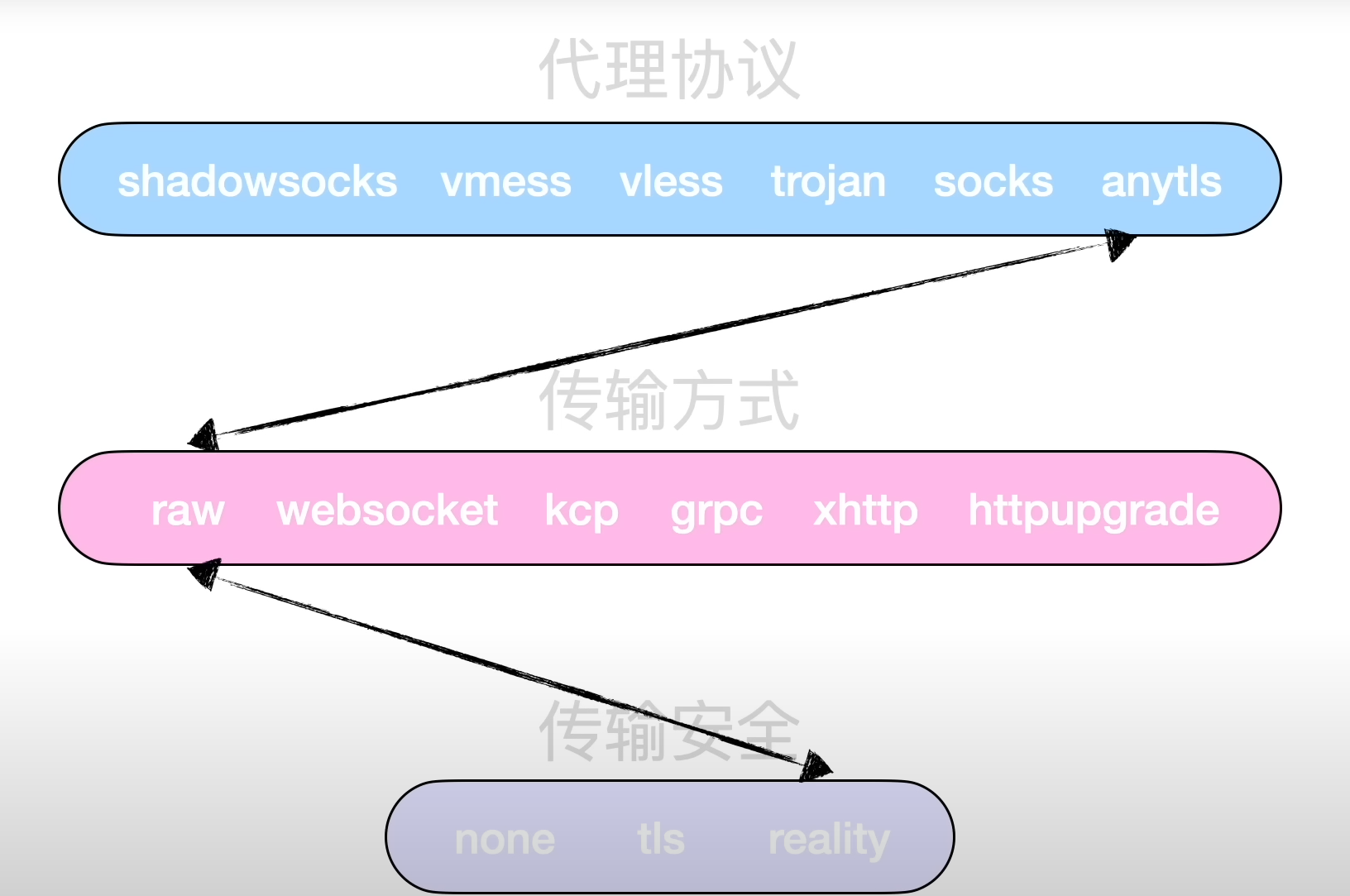
通过这个图我们就可以实现任意协议组合任意传输,比如我可以搭建普通的 vmess 节点,也可以搭建 ss+ws 的节点,或者 ss+grpc+reality 还可以将原本的协议组合打乱,比如 trojan 协议默认情况下就是套了 tls,我们可以给她换成 reality 或者直接脱掉 tls 让她裸奔 anytls 也是类似,协议默认设计成了套 tls,但我们可以给他套上 reality,也就变成了 anyreality 了
生成密钥材料
sing-box generate uuid
sing-box generate reality-keypair   # 输出 PrivateKey/PublicKey 各一行,对应服务端/客户端
sing-box generate rand 8 --hex      # 生成 short_id
anytls-reality 配置
anytls-reality server 配置
修改 password private_key short_id
cat <<EOF | sudo tee /etc/sing-box/anytls-reality.json
{
    "inbounds": [
        {
            "type": "anytls",
            "listen": "::",
            "listen_port": 56443,
            "users": [
                {
                    "name": "user",
                    "password": "123456"
                }
            ],
            "padding_scheme": [
                "stop=8",
                "0=30-30",
                "1=100-400",
                "2=400-500,c,500-1000,c,500-1000,c,500-1000,c,500-1000",
                "3=9-9,500-1000",
                "4=500-1000",
                "5=500-1000",
                "6=500-1000",
                "7=500-1000"
            ],
            "tls": {
                "enabled": true,
                "server_name": "yahoo.com",
                "reality": {
                    "enabled": true,
                    "handshake": {
                        "server": "yahoo.com",
                        "server_port": 443
                    },
                    "private_key": "eO3B3EMGXrYfGOe87NkUVusaeUxtLB4vxiqjVXqb9GU",
                    "short_id": "0123456789abcdef"
                }
            }
        }
    ]
}
EOF
anytls-reality client 配置
修改 server password public_key short_id
sudo tee /etc/sing-box/client-anytls-reality.json <<EOF
{
    "outbounds": [
        {
            "type": "anytls",
            "tag": "anytls-out",
            "server": "192.0.2.1",
            "server_port": 56443,
            "password": "123456",
            "idle_session_check_interval": "30s",
            "idle_session_timeout": "30s",
            "min_idle_session": 5,
            "tls": {
                "enabled": true,
                "disable_sni": false,
                "server_name": "yahoo.com",
                "insecure": false,
                "utls": {
                    "enabled": true,
                    "fingerprint": "chrome"
                },
                "reality": {
                    "enabled": true,
                    "public_key": "u4v3a_-uhIXPE2RoGaNy9_W5EK5UYV_hVN4Vpei75lM",
                    "short_id": "0123456789abcdef"
                }
            }
        }
    ]
}
EOF
vless-reality 配置
vless-reality server 配置
修改 uuid private_key short_id
cat <<EOF | sudo tee /etc/sing-box/vless-reality.json
{
    "inbounds": [
    {
      "tag": "VLESS-REALITY-33584.json",
      "type": "vless",
      "listen": "::",
      "listen_port": 33584,
      "users": [
        {
          "flow": "xtls-rprx-vision",
          "uuid": "xxxxxxxx-cbef-4811-a3f0-d10733e669cd"
        }
      ],
      "tls": {
        "enabled": true,
        "server_name": "aws.amazon.com",
        "reality": {
          "enabled": true,
          "handshake": {
            "server": "aws.amazon.com",
            "server_port": 443
          },
          "private_key": "xxxxxxxx_GoOG9l7xvyT_zJuh4wyHyacXGdUWiuhJGg",
          "short_id": [
            ""
          ]
        }
      }
    }
  ]
}
EOF
可选变体:multiplex + brutal(带宽抢占)
在 vless-reality 入站上叠加 multiplex(含 padding)与 brutal 拥塞控制,适合抢占带宽场景:
{
    "tag": "VLESS-Vision-Reality",
    "type": "vless",
    "listen": "::",
    "listen_port": 443,
    "users": [
        {
            "uuid": "625a08bb-d372-4f7c-a2d4-6a50ca3393ce",
            "flow": "xtls-rprx-vision"
        }
    ],
    "tls": {
        "enabled": true,
        "server_name": "aws.amazon.com",
        "reality": {
            "enabled": true,
            "handshake": {
                "server": "aws.amazon.com",
                "server_port": 443
            },
            "private_key": "mAQVEs96AtDg1V_b2POFVP8n-Uu6hBe0_1Zt-DtRzGE",
            "short_id": [
                "a118b9425a7e2dc5"
            ]
        }
    },
    "multiplex": {
        "enabled": true,
        "padding": true,
        "brutal": {
            "enabled": true,
            "up_mbps": 800,
            "down_mbps": 100
        }
    }
}
vless reality client 端基础配置
修改 uuid public_key
sudo tee /etc/sing-box/client-vless-reality.json <<EOF
{
    "outbounds": [
        {
            "type": "vless",
            "tag": "vless-out",
            "server": "192.0.2.2",
            "server_port": 13584,
            "uuid": "211d952d-cbef-4811-a3f0-xxxxxxxxxxxx",
            "flow": "xtls-rprx-vision",
            "network": "tcp",
            "tls": {
                "enabled": true,
                "disable_sni": false,
                "server_name": "aws.amazon.com",
                "utls": {
                "enabled": true,
                "fingerprint": "chrome"
                },
                "reality": {
                "enabled": true,
                "public_key": "xxxxxx-3J5ReO_EpOBSix7PYhFOzaor0r8xQtEUdjS8",
                "short_id": ""
                }
            }
        }
    ]
}
EOF
Reality 客户端 uTLS 指纹:必须配置(2026-08 实测)
- Reality 客户端强制要求 uTLS 指纹:删除
utls块或"enabled": false时配置直接无法启动,sing-box check报错FATAL initialize outbound[0]: uTLS is required by reality client(v1.12.x 实测),比「断连」更严格——连进程都起不来 - 指纹不限于 chrome:换
firefox等任意 uTLS 指纹均正常(实测可达 200),chrome只是最通用的选择 - Cloudflare 场景澄清:
- 目的站挂在 Cloudflare CDN 后面时,Cloudflare 会做 TLS 指纹识别(JA3/JA4),非浏览器指纹(Go 原生 TLS)的连接会被拦截/重置——这才是配置 chrome 指纹的现实意义
- 若「cloudflare dns」指用 1.1.1.1 做 DNS 服务器(UDP 53),与 TLS 指纹完全无关,不会因此断连
套 Cloudflare CDN 时的传输层选择(2026-08 实测/查证)
把服务端放到 Cloudflare CDN 后面时(隐藏 VPS IP / 优选 IP),传输层兼容性如下:
| 传输 | 过 CF | 说明 |
|---|---|---|
| ws | ✅ | CF 官方支持(WebSocket) |
| grpc | ✅ | CF 官方支持(面板需开 gRPC 开关) |
| httpupgrade | ✅ | 与 ws 同属 HTTP Upgrade 机制,CF 透传 101,实测可用 |
| http(HTTP/1.1 CONNECT) | ❌ | CONNECT 方法 CF 不透传 |
| h2(HTTP/2 extended CONNECT) | ❌ | xray 旧版 h2 传输依赖的 RFC 8441 extended CONNECT,CF 无此特殊回源支持 |
要点:
- sing-box 没有独立的 "h2" 传输类型(1.12.x 实测
unknown transport type: h2),"vless+h2+tls" 是 xray 旧版术语;sing-box 的 HTTP 族传输是 http / httpupgrade / ws / grpc - CF 只对 WS、gRPC 有特殊回源支持,其它 HTTP 流量按普通网页处理,因此基于 CONNECT 的传输(http / h2)无法承载代理数据流
- Reality 不能过 CF:TLS 在 CF 边缘终结,客户端拿到的是 CF 证书,Reality 镜像握手机制失效;套 CF 需自有域名 + CF 托管证书,传输层配普通 TLS
shadowsocks 配置
"inbounds": [
    {
        "tag": "SS",
        "type": "shadowsocks",
        "listen": "::",
        "listen_port": 80,
        "method": "2022-blake3-aes-128-gcm", // aes-128-gcm 密钥无限制
        "password": "hztQCU1ZB8CAuPMVFJiCJw==", // 密钥长度16,执行 sing-box generate rand --base64 16 生成
        "multiplex": {
            "enabled": true
        }
    }
]
hysteria2 配置
hysteria2 server 配置
{
  "inbounds": [
    {
      "tag": "Hysteria2-55003.json",
      "type": "hysteria2",
      "listen": "::",
      "listen_port": 55003,
      "users": [
        {
          "password": "xxxxxxxx-c295-4b16-a518-b721343e7d1c"
        }
      ],
      "obfs": {
        "type": "salamander",
        "password": "xxxxxxxx-ee95-44f9-97f2-3fefe254f223" // 执行 sing-box generate uuid 生成作为密码即可
      },
      "tls": {
        "enabled": true,
        "alpn": [
          "h3"
        ],
        "key_path": "/etc/sing-box/bin/tls.key",
        "certificate_path": "/etc/sing-box/bin/tls.cer"
      }
    }
  ]
}
hysteria2 client 配置
{
  "outbounds": [
    {
      "type": "hysteria2",
      "server": "192.0.2.1",
      "server_port": 55003,
      "up_mbps": 100,
      "down_mbps": 100,
      "password": "xxxxxxxx-c295-4b16-a518-b721343e7d1c",
      "tls": {
        "enabled": true,
        "insecure": true
      }
    }
  ]
}
httpupgrade 配置(vless + httpupgrade + tls)
服务端配置
sudo tee /etc/sing-box/client-xhttp-tls.json <<EOF
{
  "inbounds": [
    {
      "tag": "VLESS-HTTPUpgrade-TLS.json",
      "type": "vless",
      "listen": "0.0.0.0",
      "listen_port": 443,
      "users": [
        {
          "uuid": "a1b9a65d-e65a-409c-92e3-c038dd808642"
        }
      ],
      "transport": {
        "type": "httpupgrade",
        "path": "/xxxxxxxx-e65a-409c-92e3-c038dd808642",
        "headers": {
          "host": "demo.com"
        }
      },
      "tls": {
        "enabled": true,
        "server_name": "demo.com",
        "alpn": ["h2"]
      }
    }
  ]
}

EOF
客户端配置
sudo tee /etc/sing-box/client-xhttp-tls.json <<EOF
{
  "outbounds": [
    {
      "server": "www.visa.com",
      "server_port": 443,
      "uuid": "xxxxxxxx-e65a-409c-92e3-c038dd808642",
      "packet_encoding": "xudp",
      "type": "vless",
      "tag": "proxy",
      "tls": {
        "enabled": true,
        "server_name": "demo.com",
        "insecure": false
      },
      "transport": {
        "type": "httpupgrade",
        "host": "demo.com",
        "path": "/xxxxxxxx-e65a-409c-92e3-c038dd808642"
      }
    }
  ]
}
EOF
systemd 服务化
服务端(系统级,可加载 conf 目录合并配置)
sudo loginctl enable-linger user
sudo loginctl show-user user
如果您希望为所有用户启用 linger,可以编辑 /etc/systemd/logind.conf 文件,并将 LingerDefault 选项设置为 yes,然后重启 systemd-logind
sudo mkdir -p /opt/sing-box/conf
cat <<EOF | sudo tee /etc/systemd/system/sing-box-manual.service
[Unit]
Description=sing-box Service
Documentation=https://sing-box.sagernet.org/
After=network.target nss-lookup.target
[Service]
User=user
ExecStart=/opt/sing-box/sing-box run -c /opt/sing-box/config.json -C /opt/sing-box/conf
Restart=on-failure
RestartPreventExitStatus=23
RestartSec=10s
LimitNPROC=10000
LimitNOFILE=1048576
PrivateTmp=true
ProtectSystem=full
#CapabilityBoundingSet=CAP_NET_ADMIN CAP_NET_BIND_SERVICE
#AmbientCapabilities=CAP_NET_ADMIN CAP_NET_BIND_SERVICE
[Install]
WantedBy=multi-user.target
EOF
后续需要添加新的 outbounds 可以直接添加在 /opt/sing-box/conf/ 中,sing-box 会自动 merge;主配置在 config.json 中
客户端(用户级 systemd)
mkdir -p ~/.proxy/conf
cat <<EOF > ~/.config/systemd/user/sing-box-manual.service
[Unit]
Description=sing-box Service
Documentation=https://sing-box.sagernet.org/
After=network.target nss-lookup.target
[Service]
ExecStart=/home/user/.proxy/sing-box run -c /home/user/.proxy/config.json -C /home/user/.proxy/conf
Restart=on-failure
RestartSec=10s
[Install]
WantedBy=default.target
EOF

systemctl --user daemon-reload
systemctl --user start sing-box-manual.service
systemctl --user show-environment
journalctl --user -ex -u sing-box-manual.service
client 基础配置
sudo tee /etc/sing-box/client-config.json <<EOF
{
  "log": {
    "disabled": false,
    "level": "debug",
    "output": "",
    "timestamp": true
  },
  "experimental": {
    "clash_api": {
      "external_controller": "127.0.0.1:10807",
      "external_ui": "ui",
      "external_ui_download_url": "https://github.com/MetaCubeX/metacubexd/archive/gh-pages.zip",
      "external_ui_download_detour": "vless-out",
      "default_mode": "rule",
      "access_control_allow_origin": [ "*" ],
      "access_control_allow_private_network": false
    },
    "cache_file": {
      "enabled": true,
      "path": "cache.db",
      "cache_id": "",
      "store_fakeip": true,
      "store_rdrc": true,
      "rdrc_timeout": "7d"
    }
  },
  "inbounds": [
    {
      "address": ["172.18.0.1/30", "fdfe:dcba:9876::1/126"],
      "route_address": ["0.0.0.0/1", "128.0.0.0/1", "::/1", "8000::/1"],
      "route_exclude_address": [
        "192.168.0.0/16",
        "10.0.0.0/8",
        "172.16.0.0/12",
        "fc00::/7"
      ],
      "auto_route": true,
      "strict_route": true,
      "type": "tun"
    },
    {
      "type": "mixed",
      "tag": "mixed-in",
      "listen": "127.0.0.1",
      "listen_port": 10806,
      "tcp_fast_open": false,
      "tcp_multi_path": false,
      "udp_fragment": false
    }
  ],
  "outbounds": [
    {
      "type": "selector",
      "tag": "🚀 Select",
      "interrupt_exist_connections": true,
      "outbounds": [
        "vless-out",
        "🎈 Auto"
      ]
    },
    {
      "type": "urltest",
      "tag": "🎈 Auto",
      "url": "https://www.gstatic.com/generate_204",
      "interval": "3m",
      "tolerance": 150,
      "interrupt_exist_connections": true,
      "outbounds": [
        "vless-out"
      ]
    },
    {
      "type": "direct",
      "tag": "🎯 Direct"
    },
    {
      "type": "selector",
      "tag": "🐟 Fallback",
      "interrupt_exist_connections": true,
      "outbounds": [
        "🚀 Select",
        "🎯 Direct"
      ]
    },
    {
      "type": "selector",
      "tag": "GLOBAL",
      "interrupt_exist_connections": true,
      "outbounds": [
        "🚀 Select",
        "🎈 Auto",
        "🎯 Direct",
        "🐟 Fallback"
      ]
    },
    {
      "type": "vless",
      "tag": "vless-out",
      "server": "192.0.2.2",
      "server_port": 13584,
      "uuid": "211d952d-cbef-4811-a3f0-xxxxxxxxxxxx",
      "flow": "xtls-rprx-vision",
      "network": "tcp",
      "tls": {
        "enabled": true,
        "disable_sni": false,
        "server_name": "aws.amazon.com",
        "utls": {
          "enabled": true,
          "fingerprint": "chrome"
        },
        "reality": {
          "enabled": true,
          "public_key": "xxxxxx-3J5ReO_EpOBSix7PYhFOzaor0r8xQtEUdjS8",
          "short_id": ""
        }
      }
    }
  ],
  "route": {
    "rules": [
      {
        "action": "hijack-dns",
        "protocol": "dns"
      },
      {
        "action": "route",
        "clash_mode": "direct",
        "outbound": "🎯 Direct"
      },
      {
        "action": "route",
        "clash_mode": "global",
        "outbound": "GLOBAL"
      },
      {
        "action": "route",
        "network": "icmp",
        "outbound": "🎯 Direct"
      },
      {
        "action": "reject",
        "protocol": "quic"
      },
      {
        "action": "reject",
        "rule_set": [
          "Category-Ads"
        ]
      },
      {
        "action": "route",
        "rule_set": [
          "GeoSite-Private"
        ],
        "outbound": "🎯 Direct"
      },
      {
        "action": "route",
        "rule_set": [
          "GeoSite-CN"
        ],
        "outbound": "🎯 Direct"
      },
      {
        "action": "route",
        "rule_set": [
          "GeoIP-Private"
        ],
        "outbound": "🎯 Direct"
      },
      {
        "action": "route",
        "rule_set": [
          "GeoIP-CN"
        ],
        "outbound": "🎯 Direct"
      },
      {
        "action": "route",
        "rule_set": [
          "GeoLocation-!CN"
        ],
        "outbound": "🚀 Select"
      }
    ],
    "rule_set": [
      {
        "tag": "Category-Ads",
        "type": "remote",
        "url": "https://testingcf.jsdelivr.net/gh/MetaCubeX/meta-rules-dat@sing/geo/geosite/category-ads-all.srs",
        "format": "binary",
        "download_detour": "🎯 Direct"
      },
      {
        "tag": "GeoIP-Private",
        "type": "remote",
        "url": "https://testingcf.jsdelivr.net/gh/MetaCubeX/meta-rules-dat@sing/geo/geoip/private.srs",
        "format": "binary",
        "download_detour": "🎯 Direct"
      },
      {
        "tag": "GeoSite-Private",
        "type": "remote",
        "url": "https://testingcf.jsdelivr.net/gh/MetaCubeX/meta-rules-dat@sing/geo/geosite/private.srs",
        "format": "binary",
        "download_detour": "🎯 Direct"
      },
      {
        "tag": "GeoIP-CN",
        "type": "remote",
        "url": "https://testingcf.jsdelivr.net/gh/MetaCubeX/meta-rules-dat@sing/geo/geoip/cn.srs",
        "format": "binary",
        "download_detour": "🎯 Direct"
      },
      {
        "tag": "GeoSite-CN",
        "type": "remote",
        "url": "https://testingcf.jsdelivr.net/gh/MetaCubeX/meta-rules-dat@sing/geo/geosite/cn.srs",
        "format": "binary",
        "download_detour": "🎯 Direct"
      },
      {
        "tag": "GeoLocation-!CN",
        "type": "remote",
        "url": "https://testingcf.jsdelivr.net/gh/MetaCubeX/meta-rules-dat@sing/geo/geosite/geolocation-!cn.srs",
        "format": "binary",
        "download_detour": "🎯 Direct"
      }
    ],
    "auto_detect_interface": true,
    "final": "🐟 Fallback",
    "default_domain_resolver": {
      "server": "Local-DNS"
    }
  },
  "dns": {
    "servers": [
      {
        "tag": "Local-DNS",
        "type": "https",
        "domain_resolver": "Local-DNS-Resolver",
        "server_port": 443,
        "server": "223.5.5.5",
        "path": "/dns-query"
      },
      {
        "tag": "Local-DNS-Resolver",
        "type": "udp",
        "server_port": 53,
        "server": "223.5.5.5"
      },
      {
        "tag": "Remote-DNS",
        "type": "tls",
        "detour": "🚀 Select",
        "domain_resolver": "Remote-DNS-Resolver",
        "server_port": 853,
        "server": "8.8.8.8"
      },
      {
        "tag": "Remote-DNS-Resolver",
        "type": "udp",
        "detour": "🚀 Select",
        "server_port": 53,
        "server": "8.8.8.8"
      }
    ],
    "rules": [
      {
        "action": "route",
        "clash_mode": "direct",
        "server": "Local-DNS"
      },
      {
        "action": "route",
        "clash_mode": "global",
        "server": "Remote-DNS"
      },
      {
        "action": "route",
        "rule_set": [
          "GeoSite-CN"
        ],
        "server": "Local-DNS"
      },
      {
        "action": "route",
        "rule_set": [
          "GeoLocation-!CN"
        ],
        "server": "Remote-DNS"
      }
    ],
    "disable_cache": false,
    "disable_expire": false,
    "independent_cache": false,
    "final": "Remote-DNS"
  }
}
EOF
Android 版本使用
{
  "log": {
    "disabled": false,
    "level": "debug",
    "output": "",
    "timestamp": true
  },
  "inbounds": [
    {
      "type": "tun",
      "address": ["172.19.0.1/30"],
      "auto_route": true,
      // "auto_redirect": true, // On linux
      "strict_route": true
    }
  ],
  "outbounds": [
    {
      "type": "selector",
      "tag": "🚀 Select",
      "interrupt_exist_connections": true,
      "outbounds": [
        "vless-out",
        "🎈 Auto"
      ]
    },
    {
      "type": "urltest",
      "tag": "🎈 Auto",
      "url": "https://www.gstatic.com/generate_204",
      "interval": "3m",
      "tolerance": 150,
      "interrupt_exist_connections": true,
      "outbounds": [
        "vless-out"
      ]
    },
    {
      "type": "direct",
      "tag": "🎯 Direct"
    },
    {
      "type": "selector",
      "tag": "🐟 Fallback",
      "interrupt_exist_connections": true,
      "outbounds": [
        "🚀 Select",
        "🎯 Direct"
      ]
    },
    {
      "type": "selector",
      "tag": "GLOBAL",
      "interrupt_exist_connections": true,
      "outbounds": [
        "🚀 Select",
        "🎈 Auto",
        "🎯 Direct",
        "🐟 Fallback"
      ]
    },
    {
      "type": "vless",
      "tag": "vless-out",
      "server": "192.0.2.2",
      "server_port": 13584,
      "uuid": "211d952d-cbef-4811-a3f0-xxxxxxxxxxxx",
      "flow": "xtls-rprx-vision",
      "network": "tcp",
      "tls": {
        "enabled": true,
        "disable_sni": false,
        "server_name": "aws.amazon.com",
        "utls": {
          "enabled": true,
          "fingerprint": "chrome"
        },
        "reality": {
          "enabled": true,
          "public_key": "Uqr4g5-3J5ReO_EpOBSix7PYhxxxxxxxxxxxxxxxxxx",
          "short_id": ""
        }
      }
    }
  ],
  "route": {
    "rules": [
      {
        "action": "hijack-dns",
        "protocol": "dns"
      },
      {
        "action": "route",
        "clash_mode": "direct",
        "outbound": "🎯 Direct"
      },
      {
        "action": "route",
        "clash_mode": "global",
        "outbound": "GLOBAL"
      },
      {
        "action": "route",
        "network": "icmp",
        "outbound": "🎯 Direct"
      },
      {
        "action": "reject",
        "protocol": "quic"
      },
      {
        "action": "reject",
        "rule_set": [
          "Category-Ads"
        ]
      },
      {
        "action": "route",
        "rule_set": [
          "GeoSite-Private"
        ],
        "outbound": "🎯 Direct"
      },
      {
        "action": "route",
        "rule_set": [
          "GeoSite-CN"
        ],
        "outbound": "🎯 Direct"
      },
      {
        "action": "route",
        "rule_set": [
          "GeoIP-Private"
        ],
        "outbound": "🎯 Direct"
      },
      {
        "action": "route",
        "rule_set": [
          "GeoIP-CN"
        ],
        "outbound": "🎯 Direct"
      },
      {
        "action": "route",
        "rule_set": [
          "GeoLocation-!CN"
        ],
        "outbound": "🚀 Select"
      }
    ],
    "rule_set": [
      {
        "tag": "Category-Ads",
        "type": "remote",
        "url": "https://testingcf.jsdelivr.net/gh/MetaCubeX/meta-rules-dat@sing/geo/geosite/category-ads-all.srs",
        "format": "binary",
        "download_detour": "🎯 Direct"
      },
      {
        "tag": "GeoIP-Private",
        "type": "remote",
        "url": "https://testingcf.jsdelivr.net/gh/MetaCubeX/meta-rules-dat@sing/geo/geoip/private.srs",
        "format": "binary",
        "download_detour": "🎯 Direct"
      },
      {
        "tag": "GeoSite-Private",
        "type": "remote",
        "url": "https://testingcf.jsdelivr.net/gh/MetaCubeX/meta-rules-dat@sing/geo/geosite/private.srs",
        "format": "binary",
        "download_detour": "🎯 Direct"
      },
      {
        "tag": "GeoIP-CN",
        "type": "remote",
        "url": "https://testingcf.jsdelivr.net/gh/MetaCubeX/meta-rules-dat@sing/geo/geoip/cn.srs",
        "format": "binary",
        "download_detour": "🎯 Direct"
      },
      {
        "tag": "GeoSite-CN",
        "type": "remote",
        "url": "https://testingcf.jsdelivr.net/gh/MetaCubeX/meta-rules-dat@sing/geo/geosite/cn.srs",
        "format": "binary",
        "download_detour": "🎯 Direct"
      },
      {
        "tag": "GeoLocation-!CN",
        "type": "remote",
        "url": "https://testingcf.jsdelivr.net/gh/MetaCubeX/meta-rules-dat@sing/geo/geosite/geolocation-!cn.srs",
        "format": "binary",
        "download_detour": "🎯 Direct"
      }
    ],
    "auto_detect_interface": true,
    "final": "🐟 Fallback",
    "default_domain_resolver": {
      "server": "Local-DNS"
    }
  },
  "dns": {
    "servers": [
      {
        "tag": "Local-DNS",
        "type": "https",
        "domain_resolver": "Local-DNS-Resolver",
        "server_port": 443,
        "server": "223.5.5.5",
        "path": "/dns-query"
      },
      {
        "tag": "Local-DNS-Resolver",
        "type": "udp",
        "server_port": 53,
        "server": "223.5.5.5"
      },
      {
        "tag": "Remote-DNS",
        "type": "tls",
        "detour": "🚀 Select",
        "domain_resolver": "Remote-DNS-Resolver",
        "server_port": 853,
        "server": "8.8.8.8"
      },
      {
        "tag": "Remote-DNS-Resolver",
        "type": "udp",
        "detour": "🚀 Select",
        "server_port": 53,
        "server": "8.8.8.8"
      }
    ],
    "rules": [
      {
        "action": "route",
        "clash_mode": "direct",
        "server": "Local-DNS"
      },
      {
        "action": "route",
        "clash_mode": "global",
        "server": "Remote-DNS"
      },
      {
        "action": "route",
        "rule_set": [
          "GeoSite-CN"
        ],
        "server": "Local-DNS"
      },
      {
        "action": "route",
        "rule_set": [
          "GeoLocation-!CN"
        ],
        "server": "Remote-DNS"
      }
    ],
    "disable_cache": false,
    "disable_expire": false,
    "independent_cache": false,
    "final": "Remote-DNS"
  }
}
合并已有配置到主配置:
/usr/bin/sing-box -C /etc/sing-box/ merge ~/.tmp/sing-box.merge.conf
相关文章
- BBR 开启与代理场景提速实测:开启 TCP BBR 实测:代理隧道发送端才有收益
- 抓包排查:[tcpdump 抓包sing-box流量](../../08/learn/tcpdump 抓包sing-box流量/)
- 客户端配合:[clash verge 与 233boy sing-box 配合使用](../../10/clash verge 与 233boy sing-box 配合使用/)